Walking the Camino de Santiago With Offline Maps and a Phone That Works
Plan your Camino phone setup with offline stage maps, saved accommodation contacts, sensible battery habits, and realistic expectations for mobile coverage.
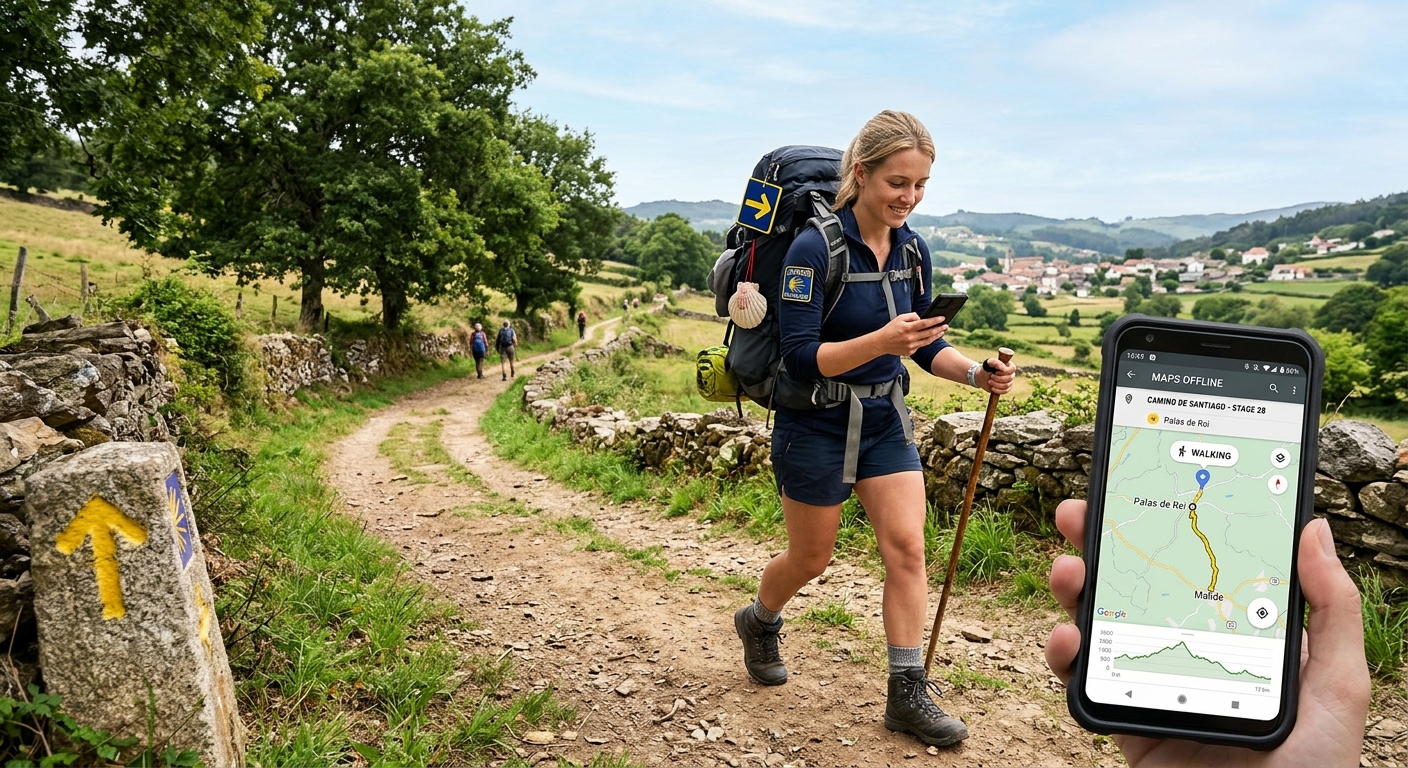
Your phone picks an awkward moment to become useless. The path splits outside a village. Rain has softened the paper in your pocket. Your accommodation address sits inside an email that refuses to load. None of this needs to ruin a Camino day, but it can turn a tired afternoon into an unnecessary argument with a screen.
A useful Camino phone setup starts before departure. Download the right maps. Save accommodation details somewhere that opens without internet. Give the battery a realistic workload. Arrange mobile data, then accept its limits. The aim is simple: keep walking without needing a working connection at every junction.
Your Pocket Plan for the Camino
- Download stage maps, route tracks, and nearby alternatives before walking.
- Test your map setup in airplane mode before leaving home.
- Save accommodation addresses, phone numbers, and arrival instructions offline.
- Arrange suitable data, but expect gaps along the trail.
- Carry tested charging equipment and keep a battery reserve.
Build Your Maps Around the Camino de Santiago Route You Will Actually Walk
“The Camino” does not describe one continuous line that every walker follows. Your downloads need to match your chosen route, starting point, and intended variants. A map for the Camino Francés will not solve a missing section on the Camino del Norte. Even within one route, an alternate path can leave the area you saved.
For each stage, save the walking route and a surrounding map area. Include the villages before and after your intended overnight stop. Add nearby road access and accommodation alternatives. A narrow strip around the trail becomes less useful when a full hostel or a sore knee changes the afternoon.
Keep the route track and the underlying map in mind as separate items. A GPX file can show a line without supplying the paths, roads, or village names around it. Downloading that file does not necessarily download the map beneath it. Both need to open when your connection disappears.
Name saved files clearly. “Tomorrow” stops being helpful after a rest day. A label containing the route, start village, and finish village is easier to understand when you are tired.
Test What Offline Actually Means
Before departure, switch on airplane mode, turn off Wi-Fi, and open your mapping app. Find your downloaded area. Zoom in until minor paths appear. Open the route track. Search for a saved accommodation address. If you expect the app to calculate walking directions without internet, test that function too.
Different apps offer different offline features. Google’s official offline map guidance states that walking directions are unavailable offline. A downloaded map can still help you read your surroundings, but that is different from generating a walking route.
Use a walking-focused mapping tool whose offline functions you have checked. Review any subscription requirements and download expiry rules before departure. An app that worked during a trial at home deserves another test before your first stage.
Turn Stage Planning Into a Small Evening Habit
Give tomorrow’s stage a few minutes of attention before bed. Check the distance, climbing, junctions, and places where you could stop early. Treat the guidebook’s stage divisions as suggestions. They do not know your feet.
On the Camino Francés, a stage involving O Cebreiro calls for attention to climbing and weather, not just kilometres. On the Camino del Norte, check which variant your track follows before accepting an app’s proposed shortcut. A shorter road connection may miss the walking route you intended to take.
Read current local notices when available. A downloaded track records a route; it cannot promise that every bridge, path, or access point remains usable. Ask accommodation staff about reported problems ahead, especially after heavy rain.
Yellow arrows and shells help on many Camino sections. They still require attention. If your screen and the signs disagree, stop somewhere safe and compare the track, surrounding paths, and any temporary notices. Blind loyalty to either a painted arrow or a blue dot is a poor navigation policy.
Save Accommodation Details Before You Need Them
A bed reservation has several useful parts: the property name, street address, map location, telephone number, and arrival instructions. Save all of them. A booking reference alone will not explain which doorway to use after reception closes.
Put the details in an offline note or locally saved document. Screenshots help with door codes and confirmation messages, but check that the text is readable. A gallery containing several hundred trail photographs is an inefficient filing cabinet.
For each planned overnight stop, keep this small contact bundle:
- The accommodation name, address, and saved map pin.
- A phone number with its international country code.
- Your confirmed arrival window and any late-arrival instructions.
- The booking reference and payment details supplied by the property.
- One or two alternative places, with their contact details.
Separate a confirmed booking from a possible bed. A saved property listing is not a reservation. Ask whether a booking is accepted, whether your place is held until a particular time, and how to report a delayed arrival.
If you may arrive late, contact the property while you still have service. A message sitting in your outbox has not reached the hospitalero. Keep your wording plain: your name, booking date, expected arrival time, and request for confirmation.
Arrange Mobile Data Before Departure
Sort out connectivity while you have dependable internet and time to read the details. Compare your existing provider’s roaming allowance with a travel SIM or eSIM. Walkers considering that option can get eSIM, after checking device compatibility, plan terms, and coverage along their chosen Camino route.
Check whether your exact handset supports eSIM and whether it is carrier unlocked. Read when the plan’s validity begins, how activation works, and what happens when the allowance runs out. Download any setup instructions you may need during arrival.
Your itinerary determines which countries matter. A walk beginning in Saint-Jean-Pied-de-Port needs attention to France and Spain. A Camino Portugués itinerary may involve Portugal and Spain. Check each country included in your own journey rather than assuming a plan covers every border crossing.
Check calling and texting separately from data. A data-only plan may support messaging apps without providing ordinary voice calls or SMS. That matters when an accommodation contact offers only a telephone number. If you keep your home line active, review its roaming settings and charges before travelling.
Coverage claims deserve a route-level check. Look at the intended network’s information for your stage villages and the countryside between them. A broad statement about service in Spain does not establish reception on a particular hillside.
Understand Why Data Cannot Guarantee Trail Coverage
A generous data allowance gives you permission to use a network. It does not place a usable signal beside every footpath. Terrain, buildings, network availability, congestion, and your handset can all affect whether a connection works.
Separate positioning from connectivity. Your phone can generally obtain a satellite position without mobile data, provided location services are enabled and reception conditions allow it. It still needs a downloaded map to show useful local detail. A blue dot on an empty background offers limited comfort.
Expect online accommodation searches, live transport information, and unsaved messages to become unavailable during a signal gap. Your basic walking plan should survive that interruption.
If a routine message will not send, wait until a sensible stop. Do not leave the marked path or climb exposed ground merely to refresh a booking app. For an emergency, keep the local emergency number available offline and learn how to read your coordinates. A phone remains one part of an emergency plan, not a promise of contact.
Give Your Battery a Job It Can Finish
Test battery life on a long walk before the Camino. Use the same navigation settings, photography habits, and tracking functions you expect to use abroad. A handset that lasts all day on a desk may struggle with hours of bright-screen mapping.
Start each stage charged. Use battery-saving settings where they do not disable functions you need. Keep the screen off between checks, reduce brightness when practical, and stop unnecessary background activity. Continuous video recording and navigation compete for the same battery.
A power bank around 10,000 mAh is a reasonable starting point for testing, rather than a guaranteed number of charges. Usable output depends on conversion losses, the phone battery, temperature, and equipment condition. Try your actual phone, cable, and power bank before relying on them.
Carry a compatible wall charger and a cable you have checked under load. Shared accommodation can mean awkward sockets and limited charging opportunities. Recharge the power bank when convenient instead of waiting until both batteries are nearly empty.
Keep the phone and charging connections dry. Avoid charging a device with a wet port. Protect equipment from prolonged direct sun, and follow the manufacturer’s temperature guidance.
Keep a Small Backup Beyond the Screen
Write your next accommodation address and phone number on paper. Add your emergency contact and a simple outline of the next stage. This weighs very little and remains readable after a cracked screen.
Keep a paper route overview or compact guide if it helps you understand the wider walk. You do not need to print every bend. You need enough context to identify the next settlement and explain where you intended to go.
Set an agreed check-in routine with someone at home. Explain that a missed message may mean poor reception or an exhausted battery. Agree beforehand what delay should prompt concern and what information they should have available.
Leave the Phone Ready, Then Let the Walk Happen
A useful Camino phone is slightly boring. Its maps open without negotiation. Its saved contacts are easy to find. Its battery has enough reserve for an unexpected turn in the day.
Prepare those things before departure, then repeat the small evening checks as you walk. Download the next section, confirm the bed details, and charge what needs charging. The reward is less time staring at a loading symbol and more attention for the route beneath your boots.
Read next
-
 Walking Australia's Long-Distance Trails Without a Tour Company
Plan the Bibbulmun, Larapinta, and Overland Track without a tour company. Real permit costs, resupply gaps, and honest nightly budgets.
-
 SIMs, eSIMs and Staying Connected on Long-Distance Walking Routes
Honest look at mobile connectivity on long-distance walking routes. Real costs of local SIMs vs eSIMs, rural coverage gaps, and activation headaches in border zones.